
Choose a direct-view LED video wall when you need one seamless, bright image across a large wall that people view from a distance; choose a tiled LCD video wall when people sit close and read detailed text. LED walls are built from modules that join with no visible gap, while LCD walls are separate flat panels whose thin bezels Christie puts at under 1 mm at best. The right answer depends on how far away your viewers are.
On this page
- What is the difference between an LED and an LCD video wall?
- LED vs LCD video wall: how do they compare?
- How close will people sit? Pixel pitch and viewing distance
- When is an LED video wall the better choice?
- When is an LCD video wall the better choice?
- What does a video wall need besides the screens?
- Frequently asked questions
- References
What is the difference between an LED and an LCD video wall?
A direct-view LED (dvLED) video wall is made of small modules covered in LEDs that emit light directly, joined into one surface with no gaps. An LCD video wall is a grid of individual flat-panel displays mounted edge to edge, each with its own backlight and a thin bezel around the screen.
This is not the same as an "LED TV". Most displays sold as LED TVs are LCD panels with an LED backlight. A direct-view LED wall has no LCD layer at all: the LEDs are the pixels. That difference is why LED walls can be any width or shape and show no seams, and why LCD walls are always a grid of rectangles.
LED vs LCD video wall: how do they compare?
LED wins on seamless size, brightness and flexible shapes. LCD wins on fine detail up close and is easier to fit into a standard wall. Most commercial projects can rule one out quickly once the room size, viewing distance and light levels are known.
| Question | Direct-view LED | Tiled LCD |
|---|---|---|
| Seams | None; modules join into one surface | Thin bezel lines between panels (under 1 mm on the best panels) |
| Size and shape | Any size in module steps, including very wide or curved walls | Multiples of the panel size, usually 46" or 55" panels |
| Brightness | Very bright; handles lobbies and daylit rooms | Bright enough for most offices; less suited to strong daylight |
| Close-up detail | Depends on pixel pitch; fine pitch costs more pixels per foot | Very fine detail; Christie cites LCD pixel pitch as small as 0.37 mm |
| Best viewing distance | Several feet and more, set by pixel pitch | Close up, such as desks or operators facing the wall |
| Service | Individual modules swap out, often from the front | A whole panel is replaced; near-seamless panels are fragile to handle |
| Typical fits | Town halls, lobbies, retail, event spaces | Operations rooms, dashboards, smaller walls, close-viewed content |
How close will people sit? Pixel pitch and viewing distance
Pixel pitch is the distance between LED pixels in millimeters. Smaller pitch means people can sit closer without seeing individual pixels. Manufacturers use rules of thumb of about 8 to 10 feet of viewing distance per millimeter of pitch, so a 1.5 mm wall reads well from roughly 12 to 15 feet.
Christie works out optimal viewing distance as pixel pitch × 8 in feet, giving about 10 feet for a 1.25 mm wall. Planar uses pitch × 10. Other vendors publish shorter "minimum" distances, so treat any rule as a starting point and look at a sample module at your real seating distance before you choose.
Text is the hardest content. If people must read spreadsheets, dashboards or small type, size the image using AVIXA's display image size standard, the same method we use for commercial displays. Close-up text is where LCD often beats LED.
| Pixel pitch | About 8× (feet) | About 10× (feet) | Typical use |
|---|---|---|---|
| 0.9 mm | 7 ft | 9 ft | Boardrooms, close seating |
| 1.2 mm | 10 ft | 12 ft | Conference rooms, executive briefing centers |
| 1.5 mm | 12 ft | 15 ft | Town halls, training rooms |
| 2.5 mm | 20 ft | 25 ft | Large lobbies, atriums |
| 3.9 mm | 31 ft | 39 ft | Large venues and events |
When is an LED video wall the better choice?
Choose LED when the image must be very large and seamless, when the room is bright, or when the wall is an unusual shape. Town hall rooms, lobbies and retail spaces are the classic LED projects.
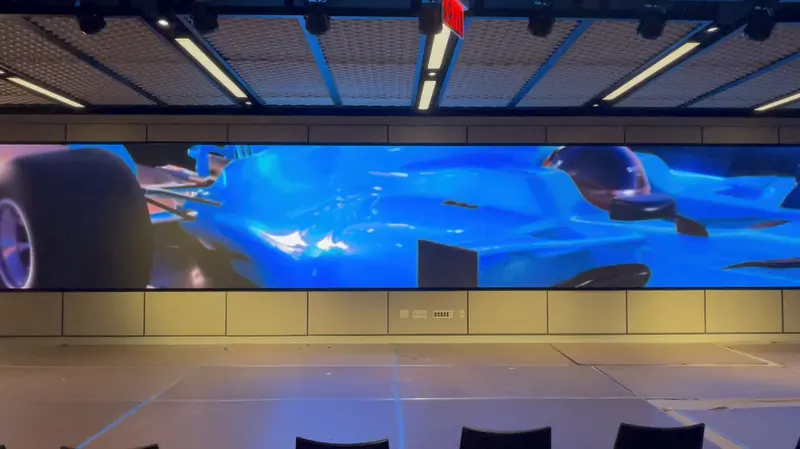
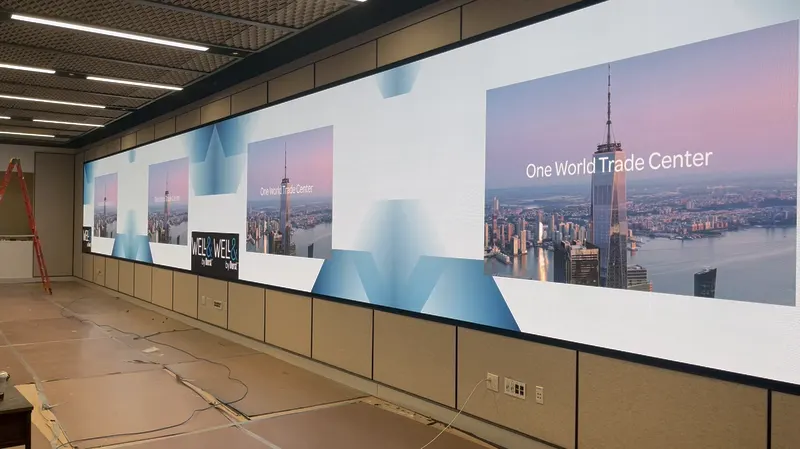
For Well & Durst in New York we installed a direct-view LED wall of approximately 60 feet across a multipurpose room used for town halls and seminars. A single display could not serve an audience spread across the full width of the room, and an LCD grid would have put seams through every image. A video processor drives the canvas so it can show one panoramic image, a presentation or several windows at once. See the Well & Durst project.
Signs LED is the right technology
- One image across a wide wall: panoramic content, brand films or a single presentation the whole audience must see.
- Viewers sit back: audiences are mostly several feet or more from the wall.
- Bright spaces: lobbies with glass, atriums and rooms that keep the lights up during events.
- Non-standard sizes: very wide, very tall, curved or corner walls that LCD panels cannot tile cleanly.
When is an LCD video wall the better choice?
Choose LCD when people sit close, when content is detailed text or data, and when the wall fits neatly into a grid of standard panels. Operations rooms, dashboards and smaller feature walls are typical LCD projects.
Bezels are the trade-off. Even ultra-narrow panels leave a thin line where they meet, which matters most when a single face or a line of text crosses a seam. Plan content layouts so key information sits inside panels rather than across them.
Signs LCD is the right technology
- Close viewing: operators or staff work within a few feet of the wall.
- Detail-heavy content: spreadsheets, maps, monitoring dashboards and small text.
- Standard proportions: the wall works as a 2×2, 3×3 or similar grid of panels.
- Normal indoor light: no direct sunlight on the screens.
What does a video wall need besides the screens?
Every video wall also needs a video processor or controller, a wall structure rated for the weight, power and heat planning, network connections, and service access. In older New York buildings the wall structure and power are often what drive the schedule.
Plan these before ordering screens
- Processing: a controller that maps sources onto the wall and switches between one full image and multiple windows.
- Structure: a mounting system and backing that suit the wall's weight and keep panels or modules perfectly aligned.
- Power and heat: dedicated circuits and ventilation sized from the chosen product's spec sheet.
- Service access: front-serviceable modules or panels so repairs do not mean removing the wall.
- Sources and control: laptops, media players, cameras and a simple way for staff to change what is on screen.
- Building logistics: delivery, freight elevator time and after-hours work rules.
Our video wall installation team plans these items in the design phase, alongside digital signage content and the room's AV system.
Frequently Asked Questions
Is an LED video wall the same as an LED TV?
No. Most LED TVs are LCD screens lit by an LED backlight. A direct-view LED video wall has no LCD layer: each LED is a pixel, and modules join into one seamless surface. That is why LED walls can be built to any size and shape without visible seams.
Can you see the seams on an LCD video wall?
Yes, at least slightly. Tiled LCD walls always show thin lines where panels meet. The narrowest panels keep this under about 1 mm, which is hard to notice from a distance, but text or faces that cross a seam can still be interrupted. LED walls have no seams.
What pixel pitch do I need for a conference room or town hall?
Work back from the closest seat. Manufacturer rules of thumb give roughly 8 to 10 feet of viewing distance per millimeter of pitch, so a room whose front row is about 12 feet away suits about 1.2 to 1.5 mm. Always view a sample module at your real distance before deciding.
Which lasts longer, LED or LCD?
Manufacturers generally describe direct-view LED as having the longer operating life, and Christie notes LCD operational lifetime is lower. Real life depends on brightness settings, hours of use, heat and maintenance, so compare the rated hours on the specific products you are considering.
Can a video wall show more than one source at a time?
Yes. A video wall processor can show one image across the whole wall or split it into windows for presentations, cameras, dashboards and live video. The layouts are set up during commissioning so staff can switch between them from a simple control panel.
Does an LED wall work in a lobby with windows?
Usually, yes. Direct-view LED is very bright and is the common choice for lobbies and atriums with daylight. LCD walls are bright enough for most offices but can look washed out in strong sun. Check the brightness rating against your real light levels before choosing.
Start with the room, not the screen
Choose LED for big, bright, seamless images that people watch from a distance. Choose LCD for close-up reading and detailed data. Then plan the processor, structure, power and service access, because those decide whether the wall works for years.
If you are planning a video wall for an office, lobby or event space in New York, we can survey the room and recommend the right technology.
References
- LED vs. LCD: What is the best technology for your next video wall project? — Christie Digital
- What is pixel pitch and why does it matter? — Planar
- Display Image Size for 2D Content in Audiovisual Systems — AVIXA
- Learn More About Display Size — AVIXA
References verified and re-checked at each scheduled review. Read our editorial policy.